Working With The Generator
How to change parameters
The generator utilizes the geometry nodes modifier. To adjust parameters, follow these steps:
Select the “!Generator” object.
Click on the wrench icon (Modifier Properties) on the right-hand side.
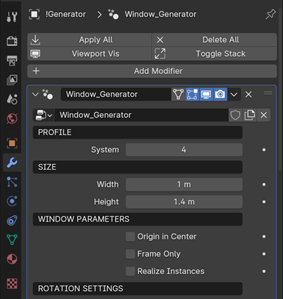
Generator structure
The generator is divided into the following sections:
- Profile
Choose from 5 built-in profiles.
- Size
Adjust the size of your window.
- Window parameters
Customize window features such as centering sash disabling and instance realization.
- Rotation settings
Modify sash rotation.
- Handle settings
Choose handle type, position, and rotation.
- Glazing settings
Select between double or triple glazing.
- Impost settings
Control the presence and attributes of the impost.
- Stulp settings
Configure settings for two-sash windows without impost.
- Materials
Assign window materials.